
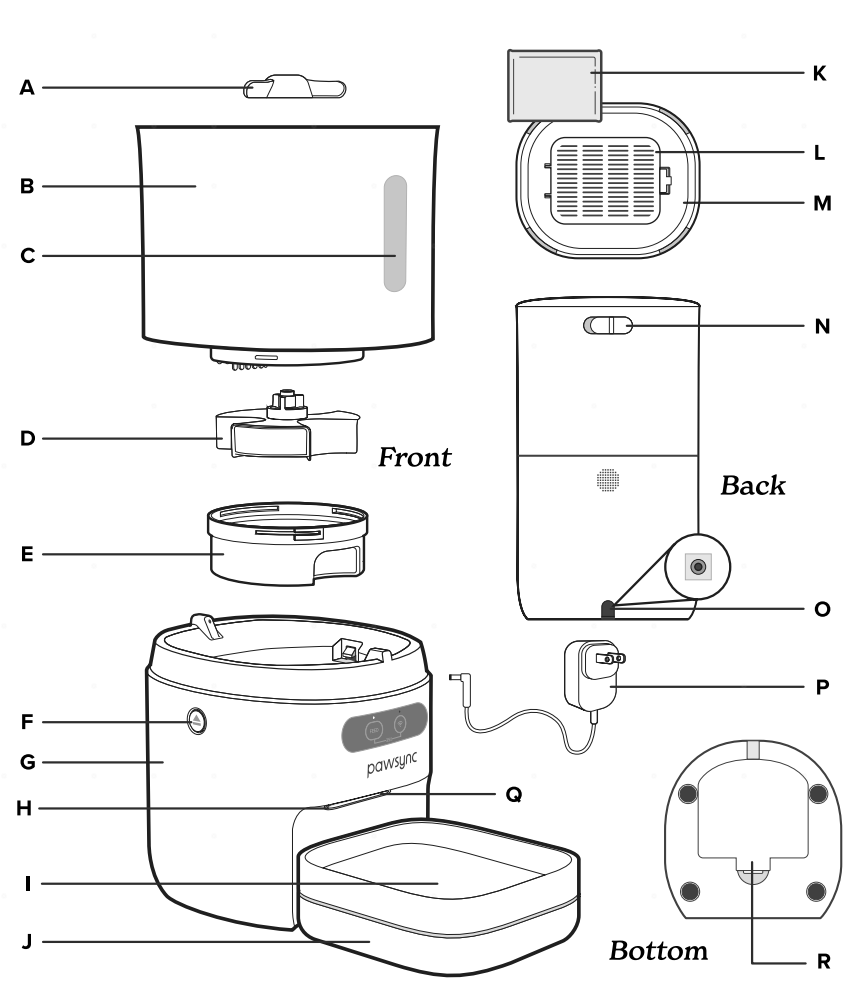
- A. Food Agitator
- B. Feeder Tank
- C. Food Level Window
- D. Food Distributor
- E. Distributor Cover
- F. Tank Release Buttons
- G. Feeder Base
- H. Food Outlet
- I. Stainless Steel Bowl
- J. Weighing Tray
- K. Silica Gel Desiccant Pack
- L. Desiccant Compartment (Underneath Lid)
- M. Lid
- N. Lid Release Button
- O. Power Adapter Port (Inside Battery Compartment)
- P. Power Adapter
- Q. Blockage Sensors (Inside Food Outlet)
- R. Battery Compartment (Underneath Base)
Control Panel
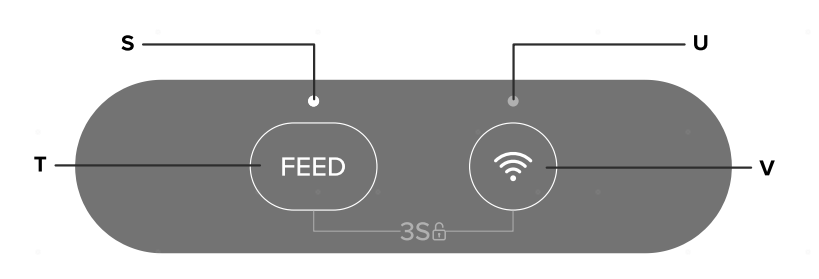
- S. Feed Indicator
- T. Feed Button
- U. Wi-Fi Indicator
- V. Wi-Fi Button
Controls & Display
Note:
- Make sure the pet feeder is unlocked before using the Feed & Wi-Fi buttons.
- You can use the Pawsync app to control the pet feeder and access additional app-only features.
Feed Button
- Press to release one portion (about 0.39 oz / 11 g) of food.
- The Feed button only dispenses a set portion of food (which varies depending on kibble size).
- Note: Use the Pawsync app to dispense custom kibble amounts and set a feeding plan.
 Wi-Fi Button
- Press and hold for 5 seconds to connect the pet feeder to the Pawsync app. See the in-app instructions for more information.
- Press twice to calibrate the weighing tray.
Automatic Lock
- For your pet’s safety, the control buttons automatically lock after 5 minutes of no operation.
- If you unplug and plug in the pet feeder, the control buttons stay unlocked for 30 minutes.
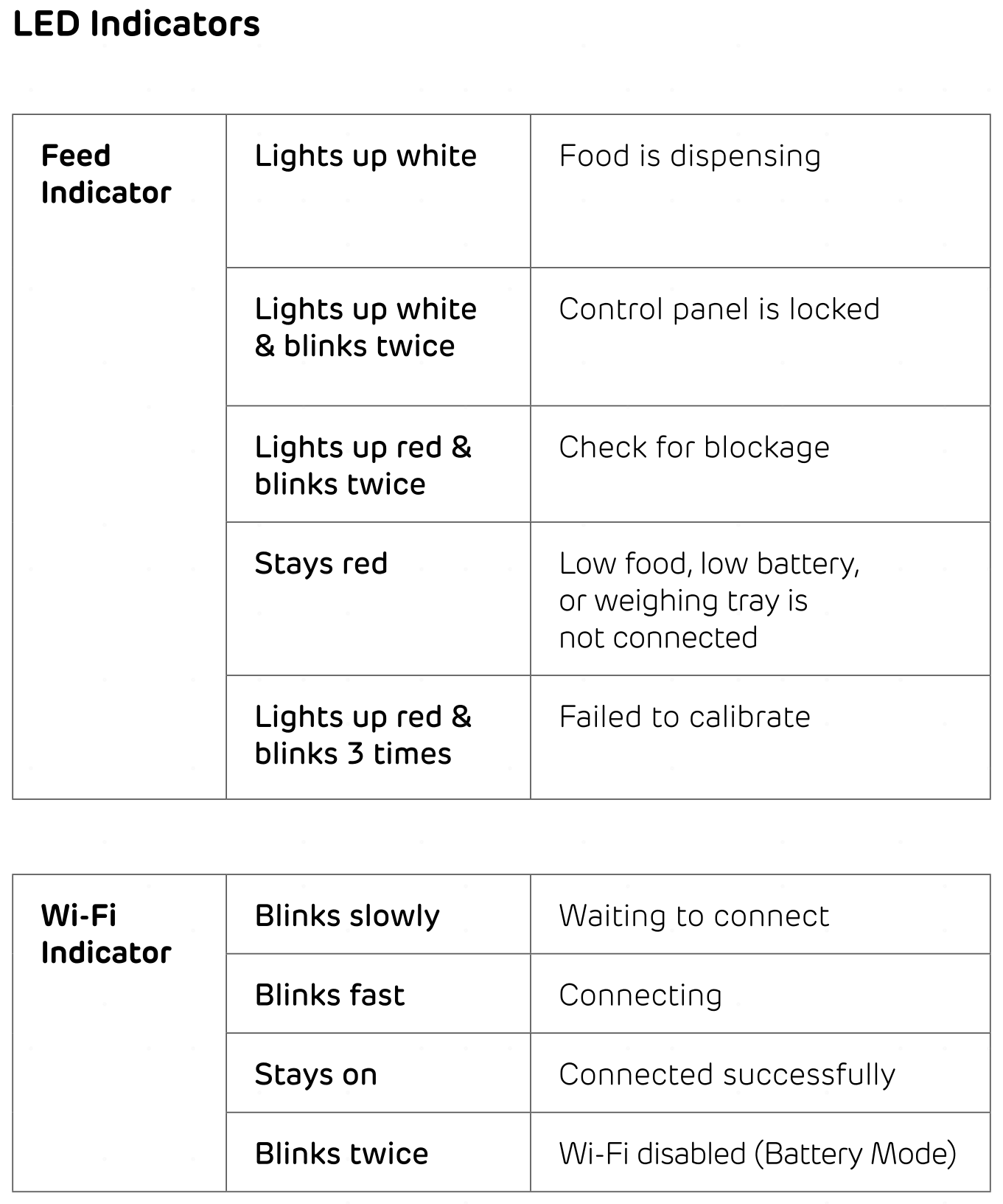
- To unlock or lock the pet feeder, press and hold FEED + for 3 seconds or until you hear a beep.
Controls & Display (cont.)
Note:
- For basic safety precautions when using the pet feeder, see Important Safety Instrucions.
- Using the Pawsync app allows you to control the automatic pet feeder remotely and access additional functions and features.
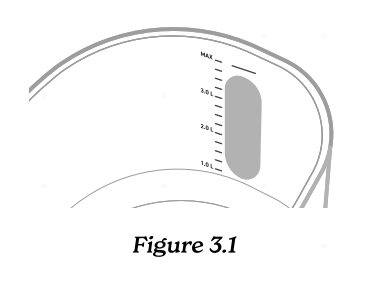
- Add kibble to the tank. Make sure food does not go over the “MAX” line. [Figure 3.1]
Note:
- Only use dry kibble in the pet feeder. Do not use wet food.
- We recommend using kibble 0.2–0.6 in / 4–15 mm in size.
- Press FEED to manually dispense one portion of food.
Note: When you refill the empty pet feeder, the food agitator will rotate once without dispensing. This allows kibble to enter the food distributor. Press FEED again.
- If food is low, the Feed Indicator will light up red and the Pawsync app will send a notification to your phone. Add more kibble.
Calibrating the Weighing Tray
The weighing tray measures precise kibble amounts for your pet. Before calibrating the tray, make sure the bowl is empty and the bowl and tray are on a level surface.
- Press twice to calibrate the weighing tray. The feeder will beep twice when reset.
Note: Always calibrate the weighing tray after removing the bowl or tray.
For your pet’s health, we recommend that you regularly clean the pet feeder.
Disassembling & Cleaning the Pet Feeder
- Unplug the pet feeder.
- Make sure there is no kibble inside the tank or bowl.
- Remove the bowl and tray from the base.
- Remove the lid, then remove the silica gel pack from the desiccant compartment.
- Press the Tank Release Buttons to remove the tank from the base.
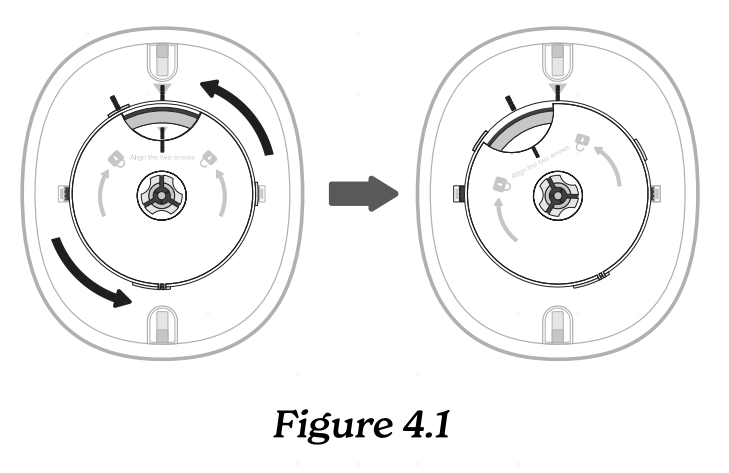
- Flip the tank over. Turn the distributor cover counterclockwise to remove it. [Figure 4.1]
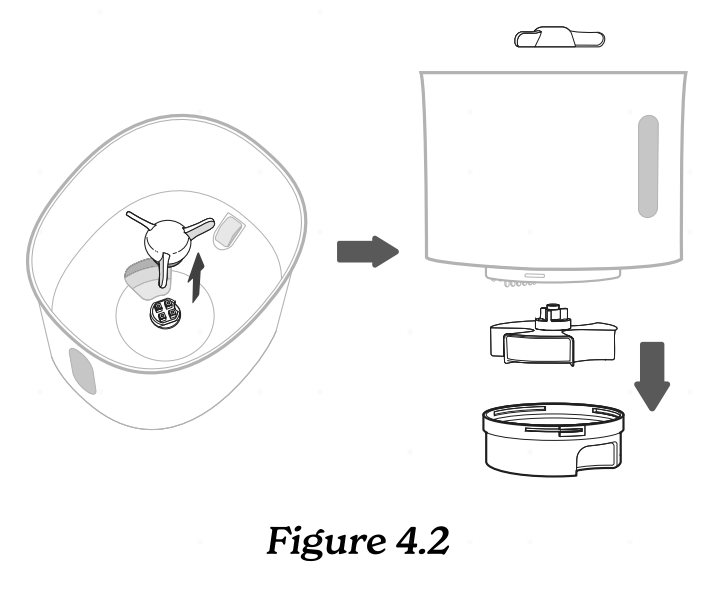
- Pull the food agitator to remove, then slide the food distributor out from the center of the tank. [Figure 4.2]
- Wash the tank, lid, food agitator, food distributor, and distributor cover with soap and water. Allow to fully dry.
- Remove the stainless steel bowl from the tray. Wash the bowl with soap and water. Allow to fully dry.
- Use a dry cloth to clean the tray and base.
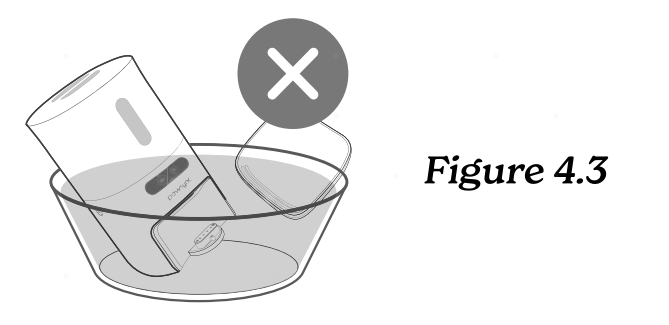
WARNING: The weighing tray and base contain electrical components and sensors. DO NOT rinse with water, soak, or use cleaning solutions that may corrode the product. [Figure 4.3]
- Allow all parts to fully dry before reassembling.
Assembling the Pet Feeder
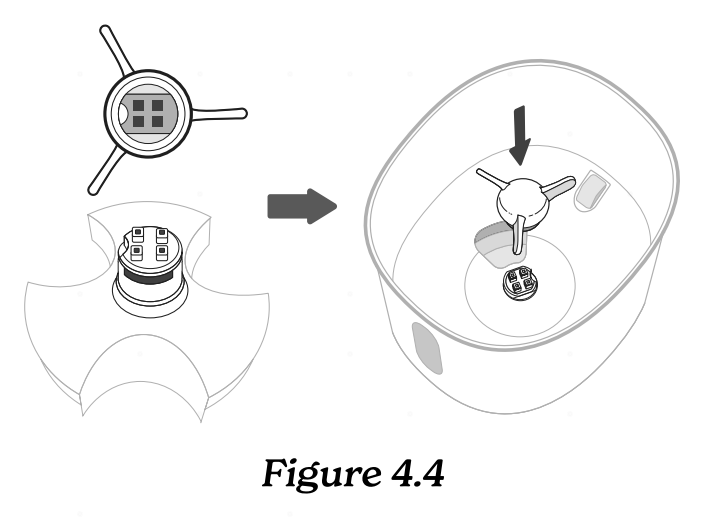
- Insert the food distributor through the center of the tank, then press the food agitator onto the distributor.
Note: Make sure the food agitator is aligned with the studs on the food distributor. [Figure 4.4]
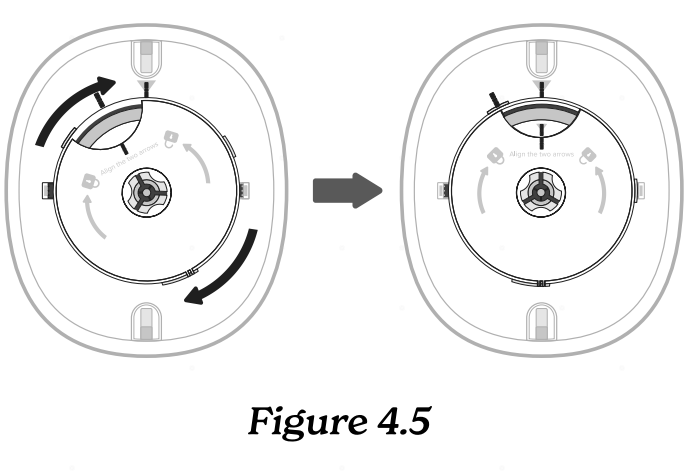
- Place the cover over the food distributor, then turn clockwise to secure.
Note: Make sure the 3 lines are aligned. [Figure 4.5]
- Place the tank onto the base and click in place.
- Place the silica gel pack into the desiccant compartment, then replace the lid.
- Press the tray firmly onto the base, then place the bowl on the weighing tray.
- Plug in the pet feeder and calibrate the weighing tray.
Power Adapter
- This device is only to be used with the power supply unit provided with the device.
- To disconnect, turn all controls to the off (“O”) position, then remove plug from outlet.
- Do not unplug by pulling on cord. To unplug, grasp the plug, not the cord.
- Unplug from outlet when not in use and before servicing or cleaning.
- Do not operate any appliance with a damaged cord or plug, or after the appliance malfunctions or is dropped or damaged in any manner. Return appliance to the nearest authorized service facility for examination, repair, or electrical or mechanical adjustment.
- Keep the feeder near the outlet it is plugged into. The use of an extension cord is not recommended.
- Do not plug in if there is water on the cord or power adapter.
- Never place the cord near any heat source.
- Do not cover the cord with a rug, carpet, or other covering. Do not place the cord under furniture or appliances.
- To avoid a tripping hazard, keep the cord out of areas where people walk often. Place the cord where it will not be tripped over and safely coil the cord.
- A loose fit between the outlet and plug may cause overheating and a distortion of the adapter. Contact a qualified electrician to replace a loose or worn outlet.
- Unplugging the power adapter will disable remote control of the feeder and temporarily disconnect the feeder from Pawsync and other third-party apps.

WARNING: Danger of explosion if battery is incorrectly replaced. To reduce risk of fire, explosion or leakage of flammable liquid/ gas, do not disassemble, crush, puncture, short external contacts, expose to temperature above 140°F (60°C), sunshine, or the like, expose to extremely low air pressure, or dispose of in fire or water. Only replace with specified batteries.
Electromagnetic Fields (EMF)
The Pawsync Automatic Pet Feeder complies with all standards regarding electromagnetic fields (EMF). If handled properly and according to the instructions in this user manual, the appliance is safe to use based on scientific evidence available today.
